Fossil SCM - My Git Replacement
When it comes to software versioning git has undoubtedly become the number one tool. Buuuuut that doesn't mean that there aren't other ones out there.
Now you might ask: "Why use a different tool when we already have git" and...sure that's a valid point. If you're happy with git then use git. There are people out there still programming in C89 because it just works. But don't get me wrong; I adore this approach. I think that it is a perfect way to become very productive to just have some tool, may that be a piece of software or a programming language or maybe a favorite pan with which you make some amazing pancakes and never change them out. They may be 40 years old but if they get the job done and everyone loves your pancakes then "why the hell change it"?
I could never hold on to one thing for too long. For one because I like to try out new things but I also have little choice when someone else dictates which language to use at work. But I also think that if you're only profitient with your favorite hammer, everything you see will look like a nail. Same goes with software or programming. I think that different programming languages have their use case and different SCMs also do.
Please note that even though I talk about a lot of the cool stuff fossil does or can do, it of course also has it's drawbacks. Theres no such thing as a silver bullet. This isn't meant to be a 'fair comparison' by any means and it's also not supposed to be a super in-depth guide. I just wanna talk about fossil ok.
Cool stuff in fossil #
So for me personally and for others probably aswell the biggest selling point of fossil is that it not only packs a web-ui but also most other things you'd need in a software control system like an issue tracker, wiki, live chat and so much more.
It's also all included in one binary so no gigantic pile of dependencies
and installation pain. Just hit em with the old sudo apt install fossil and
you're set baby. The usage is quite similar to git even:
# go to ye old project
cd project/

# Well that's weird...we'll talk about it a little later
fossil open project.fossil

# make changes using the only viable editor
nvim src/super_important_file

# commit changes
fossil commit -m "super important changes"

# view your project in your browser?! whaaaaaaat???
fossil ui

# no need to worry, everything can also be done via cli in your terminal such as
# viewing the log (aka timeline)
fossil timeline
You might have already seen that there are some things that are a little different from git so let's just talk about them:
Fossil uses a single file for the repo history #
Unlike git, fossil stores everything about the repository in a single file. It's
actually an sqlite3 file so you could just look at it with sqlite3 project.fossil. Neat!
Also the repo database doesn't need to the in the same directory as the source
code. Meaning you could just have every fossil repo at ~/fossils and your code
somewhere else like ~/code. Then just cd ~/code/project and fossil open ~/fossils/project.fossil and you can start working.
It's also important in which directory you are when calling fossil open. Say
you were at ~/ and called fossil open there, fossil will then tell you that
files are missing and it will just be a bad time. I have to say that this threw
me off a little at first. It was really weird since I just used fossil locally
and once I set up fossil on a remote and cloned the repo I just assumed that it
would be like git. I must've missed that somehow in the docs but yeah...those
were some very confusing minutes I must admit.
This means that you can have a directory for each branch you're working on. So just:
code
|-project
  |-main
  |-feature1
  |-feature1
  |-...
And then cd ~/code/project/main and fossil open ~/fossils/project. What's the
advantage over fossil stash or just using branches? Well...I'm...not too sure to
be honest. If I find out I'll come back and write about it here. But yeah fossil
also of course has branches and stashes. Like it should.
Speaking of branches:
'main' is called 'trunk' in Fossil
Makes a lot more sense with the 'branch' wording when you think about it... deal with it.
Anyway back to topic. One thing that makes this also really easy is self-hosting. You can just copy your fossil repo over to some remote and have easy self-hosting.
# copy to remote
rsync project.fossil server:/scm/project.fossil

# clone on different device
fossil clone ssh://server//scm/project.fossil
And that's it. That's how you would do self hosting. Of course you should probably do correct sysadmin stuff with creating a fossil group and restricting access and all that stuff but this is probably the most minimal thing needed to do self hosting and I think that it's insane that not everything can be set up that easily...it's 2025 guys get your shit together.
Fossil has auto-sync #
This is - for me at least - one of the very big features and is also one thing mentioned in the fossil docs as to why fossil was created in the first place:
"Monotone, Git, and Mercurial were all considered. But at that time, none of these supported sync over ordinary HTTP, [...]
So how does auto-sync look like? If you've cloned fossil from a remote you can
make a commit and fossil will check before the commit is made if the remote has
any new commits. In case that there are new ones, fossil will pull the changes,
apply your changes on top of them and push your commit to the remote. And the
best thing: it's all enabled by default. You legit just have to fossil commit -m "message" and everything will be synced automatically. Sync is also done
when changing branches (done via fossil update).
Since I have multiple devices and actually use all of them, this feature is invaluable for me.
Web jazz #
I've already spoiled it but yeah fossil has a web-ui. Now compared to the people around me I'm more on the extreme side of doing stuff in the terminal. I do most things in the terminal like using git/fossil, editing with neovim, file management, software deployments via ansible, system settings, controlling remote systems with ssh, you name it. I've grown used to it during my days in university when we were tought vim and C programming in the terminal on linux machines. Probably the best thing that has happened to me...anyway.
I do appreciate that fossil has a web-ui and not just that: you can also serve
that website with the built in fossil webserver! Just fossil server and you've
got a running instance of fossil on port 8080. You can (and probably should) use
fossil ui for local development. This will open up a web-ui with an overview
of your project and it provides interactive use over the web-ui to do a lot of
things.
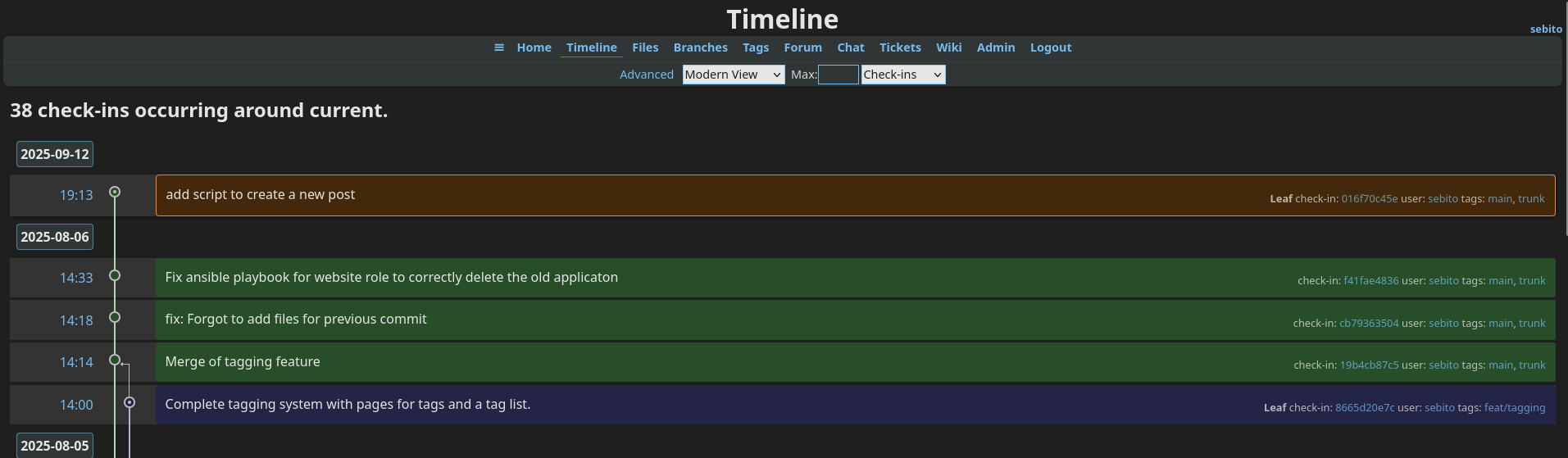
I think it's neat to have an alternative to CLI for when you're too lazy...I mean lazygit is also just a UI for when you're too lazy to do all the git stuff by typing and people love it.
It's not a bad web-ui either. It has options for things that I didn't even think about like being able to add an Ad-Unit at the menu bar for people that do advertisements for their self-hosted repo? I think it's crazy that they would think of and implement stuff like that (in a good way).
Also you can use fossil via CGI if that's your thing.
No rebasing zone #
Yeah you read that right: no rebase! Fossil is a rebase free zone. Why? Well don't take it from me; the fossil devs actually made a whole document explaining why they don't like rebasing.
My take-away is that rebasing doesn't add value but instead does the entire opposite and since it should be avoided the fossil devs simply omitted the feature. Based...or should i say...rebased?
I'm honestly just getting started with fossil so I'm no one to defend or say something against this statement. Fossil can supposedly deal with fucked up commit histories and can provide a way to display the history in a clean way (which they say git lacks as a result of needing rebase) but yeah...I ain't no fossil expert so I guess I'll fuck around, find out and come back to tell the tale.
I am able to say something about siloed development though: I'm currently in the situation where I'm stuck being a rebase power user for a large part of my development work so it's basically the complete opposite angle. I can definitely agree that rebasing causes siloed development. You CAN NOT work on the same branch if you rebase. It is simply pain. Don't do it. Everyone will become unhappy and have a bad day and will eat cookies as a form of compensation and die of diabetes. You don't want to be the reason that people die of diabetes so don't try to work on the same branch when you're constantly rebasing!
"But wait if you can't rebase then you can't delete or move commits made to the wrong branch right?" That's what I thought but there are ways to deal with this.
If you've accidentally committed your ssh private keys again you can purge or even obliterate a commit which...let's be honest that sounds kinda cool. This will delete a commit but could destroy your repo in the process ¯\_(ツ)_/¯
Final notes #
There are probably a million billion things that I haven't mentioned but if you want to find out more just install fossil, play with it, read the docs and the forum. The people there are really helpful and nice and maybe fossil just fills that spot where git left you wanting.
Links #
Used in this doc in order of appearance: