De-bloating Android the Easy* Way
I'll give you my learnings first since that's why you're probably here. I've shared my thoughts on the matter further down.
Guide #
I'll assume you don't know anything about adb and debloating. If you do you're probably wasting your time reading the guide and can instead help me improve it hehehehe. Seriously though, let me know if something can be improved here.
The easiest way I found you can uninstall apps that are protected is by using adb, the android debug bridge. It's an official tool for android. Read into it if you're interested. That's why I've decided to call it the 'Easy*' way since, at least in my case, Samsung doesn't make it any easier than that.
You need:
- your phone (duh)
- a compooter
- a cable to connect your phone with your PC
Disclaimer: I am not responsible for any damages that might occur when you follow this procedure. I advise you to do your research before doing anything and especially not follow random guides on the internet (like this one) blindly!!! With that out of the way:
Phone setup #
You need to enable the developer tools and USB Debugging. Here I even copied you the LLM summary from duckduckgo so you don't need to search for it:
To enable developer mode on an Android device, go to "Settings," then "System," and select "About phone." Tap on the "Build number" seven times, and you will see a message indicating that developer options are now enabled.
Thanks DuckAI, very cool.
There should be a new entry called 'Developer Options' in your settings. In developer options under the 'Debugging' settings enable 'USB Debugging'. You can undo this once you're done debloating.
PC setup #
- Install ADB
- ???
- Profit
Memes aside, I can't give you a lot of guidance for this one since installation
of adb varies based on operating system. I can only tell you that on Fedora 43
you can install it by installing the android-tools package sooo...good luck!
Debloating #
Now the fun part. The routine looks like this: list installed packages, remove them. Sounds easy but there are some hurdles. I'll get into those later.
Plug you phone into your PC. Your phone should ask you if you want the PC to be able to debug it. Should looke like this:
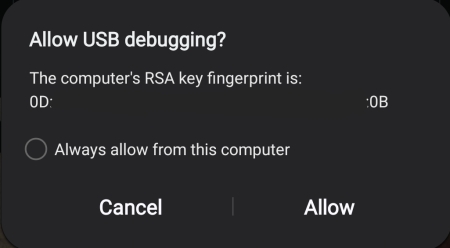
Hit allow, optionally 'Always from this computer'. (I've had file transfer on as well but maybe that changes something idk)
On your computer you should now be able to run adb commands then and they should land on your device. Open up your terminal and start a shell on your phone with this short command
adb shell
You should now have a shell session open with which you can control your phone. If your USB connection breaks you might have to re-confirm the USB debugging and open a new shell.
With this we can uninstall everything we want. This also means we can uninstall important stuff so don't go too crazy. As with everything: make sure you know what you're uninstalling before you do so or you can turn your previously working phone into a...not so working phone.
List packages with
pm list packages
You can do normal shell piping and should even have grep installed to search for specific packages by name like this
pm list packages | grep 'com.samsung'
If you have a package you want to uninstall use this command:
pm uninstall --user 0 com.my.app
Note: The --user 0 is required to uninstall it completely. Otherwise it will
say 'Success' but not have actually deleted anything...oh well.
Since we're sadly working with package names and not app names, finding out what
app uses what package name can be a little difficult since they're not always
1:1. For example, the package name for Google Meet is, at the time of writing,
com.google.android.apps.tachyon...yeah this is what I mentioned as 'hurdle'.
I've found that you can search the app stores for the package names and get information about the apps. This varies based on app. Apps made by Samsung seem to mostly only be in the Samsung App Store (called Galaxy Store) while most other apps are in the Google Play Store.
For google play, replace the package name after the ?id= in this URL:
https://play.google.com/store/apps/details?id=com.my.app
For the Galaxy Store, replace last part with package name: https://galaxystore.samsung.com/detail/com.my.app
Perhaps your launcher also helps you display that information for you. I use Kvaesitso and tapping and holding an application opens up this window which shows the package name:
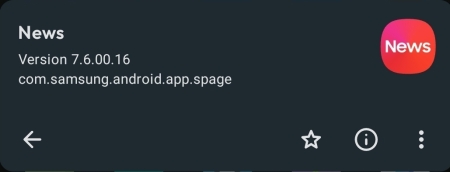
Otherwise search engine or LLM '<App name> package name' and it will most likely come up. I'll say it once more: Double check though before you uninstall anything!
In my research I've also stumbled upon this little gem.
Thanks Samsung, very cool.
If you have an android phone, I would check to see if you have this app installed and uninstall it. I did so and it didn't brick my phone so it was useless while it was there and seems to do no harm whilst it is gone.
That's it #
If you're done, remember to disable USB-Debugging and if you don't want to tinker around with it anymore you can uninstall ADB.
My thoughts on the matter #
I try to keep this section as productive as possible but I need to get this off my chest: I FUCKING HATE HAVING TO DO THIS and I think you should too.
Normal User Experience #
Consumers buy phones and want them to work out of the box and so companies need to pre-install software onto these devices. But aside from relevant software like drivers, UI Systems, maybe a browser and some app store, big companies also pre-load what I would consider 'bloat' software onto the device as well. Now you could argue that 'it's is just bloat for you and all other people actually use it'. Fair, then I'll just uninstall the app and...wait...I can't uninstall it? What? Why not? Why do I need 'Link to Windows' on my phone? Clearly it's not integral to the functioning of the system. Is Samsung just stupid?
No - of course they're not stupid. They simply made a deal with Microsoft to have the app installed on your phone and prevent you from uninstalling it as part of their deal. And that's what it's all about: you are not the one who decides how your user experience is on your device. Samsung is. They decide what you can and can't do. And in doing so, they make money. It's always about corporate greed. Of course you can decide to break out of this 'protected realm' and reach for tools and methods I've outlined above but they know very well that the average user will not do that.
What I think is the most disgusting part of this is that they pre-load actual SpyWare and then don't even fix it themselves (see the article about 'AppCloud' I linked to).
The En-Shittified User Experience #
These companies do even less than caring for you: they actively sabotage and disrupt your experience with your device. And people don't care. I never quite understood why people are so fine with buying a new phone every year. Like sure if you really do need more capable hardware as in a better camera, a 5G receiver, NFC capabilities, ..., then an old phone has to go. But unless you really need to (and I think you often don't really need to): what's the issue with current phones? Oh...what was that? They're getting slow? How weird! It was fast on the first day you used it, right? Hm...did you swap out the CPU? Or did you maybe swap out your storage to a smaller one? Or did you shrink down or installed worse RAM? The answered is of course 'no'. My point is: phones become slow because software is getting worse and bloat is getting more bloated. Your old hardware is perfectly capable but it's not sustainable for the corporation to have you keep your working device and not spend money on new things.
I could rant for hours about how this is destroying the world but I'll cut myself short and just say: this needs to stop. This cannot be a 'world of progress' if we place down artificial barriers and waste year of actual hardware progress by building worse applications. Users pay for their devices so they should do whatever the they want with them. And these devices are powerful and capable so they should not slow down year after year until they become quasi unusable. Making new generations of hardware is truly difficult and wasting all these decades of hardware advancements just so it can keep up with the trend that software gets slower and more bloated year by year is madness!
I will not be content in a world where I have to pay for companies laziness and greed. And neither should you. Getting rid of some apps is definitely not the end all be all of reclaiming your device but at least it's a start.